
INCREASE YOUR GIFT
It's as easy as 1..2..3!
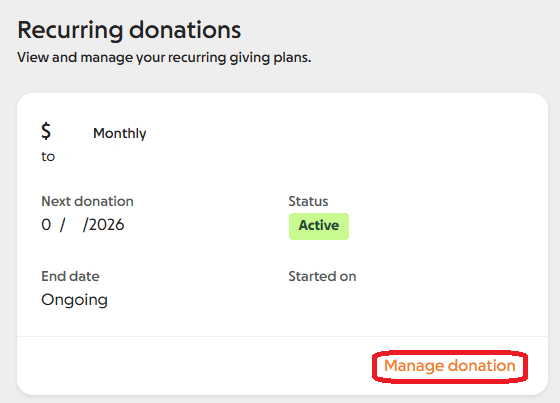
STEP 1: LOG IN and select 'Manage Donation'
STEP 2: Click the pen icon to the right of 'Contribution Details'
STEP 3: Celebrate the power of community action!
Having issues? Check out our instructions below or reach out!

We're so grateful to count you as a committed friend and Monthly Helper. When you increase today, a group of generous donors will MATCH your increased amount for 12 months, up to $50,000!
Your monthly generosity will be leveraged to make an even bigger impact. Don't miss out, this opportunity is only available once this year, ending May 31.
MAKE A ONE TIME GIFT
Already a monthly helper? Give an extra helping this month with a
one-time gift!
Donate locally with confidence


Frequently asked questions
How do I log in?
How do I manage my recurring giving?
My password doesn't work
How can I get a receipt for my donation?
I don't see all my gifts in my account
How to Update Your Recurring Gift
Step 1: Log in to your account
Note: If you had an account before March 1, 2026, you will need to reset your password. Please use the email address associated with your giving (where you have received receipts or notifications about your gifts). If you're not sure which email address to use, feel free to reach out to us.
Step 2: Find your recurring giving plan and click "Manage donation"
Step 3: Upgrade the amount you give
Use the edit button (the pencil icon in the top right) to make changes to your recurring gift.
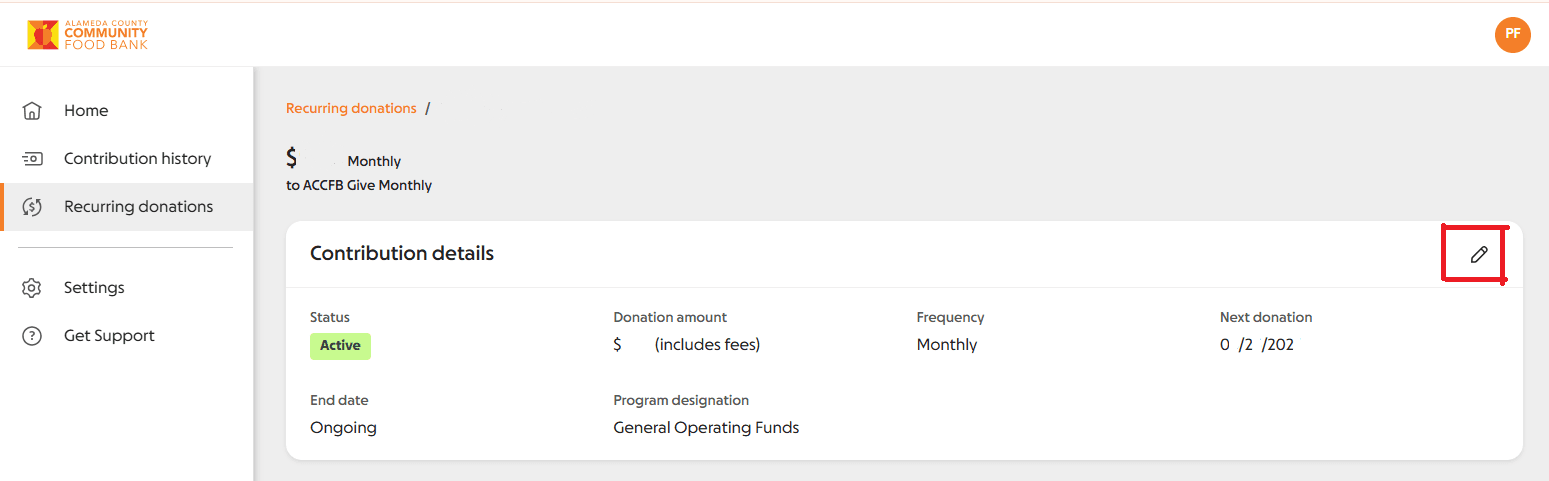
Need to update your credit card information? Scroll down to Payment Details and click the edit button (the pencil icon in the top right).
Looking for a receipt of your recurring gift? Reach out!
|
Alameda County Community Food Bank 7900 Edgewater Drive |
Questions? Email: donate@accfb.org
|